
ADMINISTRATIVE MEMORANDUM
To: Secondary School Principals and Teachers
From: Dr. Bri Conley, Director of Educational Equity & Access
Date: October 19, 2026
Subject: Attendance-Based Grade Reductions Report and End of Term Process
For teachers who have elected to use attendance-based grade reductions under HB 502 and have included this practice in their approved course disclosure, IT has developed a report to support implementation. The Grade Adjustment Video provides step-by-step instructions for accessing the report and applying an attendance-based grade reduction.
Please remember the following:
- Attendance-based grade reductions are optional.
- A student must have 5 or more unexcused absences during the grading term to be eligible for a grade reduction.
- Parents/guardians have a week to excuse their student’s absence.
- Absences beyond the one-week grace period may be excused at the principal’s discretion only when extenuating circumstances exist or a district attendance coding error has occurred.
- At this time, unexcused tardies may not be used to determine eligibility for an attendance-based grade reduction.
- Teachers may reduce a student's grade by up to, but no more than, 10% of the total points available for the course during the grading term.
- Any attendance-based grade reduction must be included in the teacher's approved course disclosure document.
- The attendance columns are a new feature that PowerSchool has added to the gradebook for reference. Those columns should not be used for adjusting a student’s grade because they do not differentiate between an unexcused and excused absence or tardy. They are simply a count of all absences or tardies for that class. If a teacher wants to see a report of unexcused absences, they can use Analytics and Insights by clicking on the waffle menu in the top right corner.
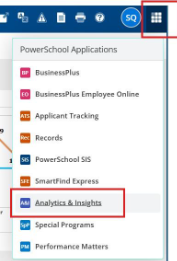
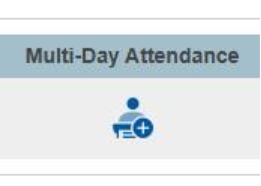
The unexcused absence should be the first report that loads after clicking on that link. One thing to note, however, that report does not consider the 1 week grace period that families have to excuse an absence. So, you could see a student with 5 unexcused absences, but the 5th absence occurred yesterday. If teachers go into their multi-Day attendance view for each class, they can see when the last unexcused absence was to determine if it was longer than the 1 week day grace period.
The video demonstrates how to:
- Run the attendance report in Analytics & Insights.
- Review the number of unexcused absences by class period.
- Identify students who meet the eligibility threshold of five or more unexcused absences.
- Create an assignment in the gradebook that can be used to apply the attendance-
based grade reduction.
If you have questions about attendance, please reach out to Bri.conley@slcschools.org.
For grade-related questions, please reach out to Dr. Tiffany Hall at tiffany.hall@slcschools.org.
